
AI SDR: what it actually does, what it costs, and what to never hand it
An AI SDR is software that takes on part of a sales development representative’s job: finding people worth contacting, researching them, and writing and sending the first outreach message, with a human reviewing or supervising the result instead of typing every message by hand. This guide covers what that means in practice, how the real tools on the market split into three different jobs, how to judge one before you buy it, and where an honest entry called EaseClaw fits into the picture.
What exactly is an AI SDR?
An AI SDR is software built to do the first half of outbound sales prospecting: deciding who is worth reaching out to, researching them, and drafting the outreach message, with less of a human’s time spent typing it from scratch. It is a job description, not a single kind of product. The label gets used for an email-sending platform with an AI writing feature bolted on, for a LinkedIn-focused agent that sources its own prospects from signals, and for an enterprise product that runs entire outbound motions end to end. All three get called an AI SDR today, and they are not interchangeable purchases.
The part every real one shares is this: it removes some of the manual research and drafting work that used to sit entirely on a human rep, and it does so continuously rather than in one batch a week. What differs, tool to tool, is how much of the decision, who to write to, when, and in what words, it is actually trusted with, and that is the question worth asking before comparing prices.
What does an AI SDR do differently from a human SDR?
A human SDR’s week is mostly research, list building, drafting the first message for every name on the list, and following up on a schedule, with a much smaller share spent actually talking to somebody who replied. An AI SDR is built to compress the first part of that week: research and a first draft that used to take minutes can happen in seconds, and the more capable tools will also work out who is worth writing to in the first place, from a live signal such as a job change or engagement with a competitor’s post, rather than a static list somebody handed it.
What it does not do, in any of the products on this page, is replace judgment on an actual reply, book and run the meeting itself, or, in most cases, send anything outside limits a human set up in advance. The honest way to think about an AI SDR is as a set of hours removed from the front of the job, research, list building, the first draft, rather than a replacement for the role. Where the line sits between “removed” and “still yours” is the single biggest difference between the tools in the next section.
How does the AI SDR tool landscape actually split?
Nine tools, four lanes, each one doing a genuinely different job rather than competing for the exact same buyer. Pricing below was re-read against each vendor’s own site on 26 September 2026, and where nothing is published, this guide says so instead of quoting a third-party estimate.
The agent's main channel is a mailbox it sends from, with other channels layered on top of it.
The agent's main channel is a connected LinkedIn account, with email added as a secondary step at most.
You still build the list and the steps. The AI sits inside the sending infrastructure, not in the decision of who to write to.
One founder, one LinkedIn account, no list to build first.
How do you evaluate an AI SDR before buying one?
Start with the channel, not the label. A tool whose main channel is a mailbox is really an email sending platform with an AI feature added, and the question to ask is whether it decides who to write to or only drafts to a list you already built. A tool whose main channel is a connected LinkedIn account is a different purchase entirely, bound by LinkedIn’s own note limits and sending pace rather than a mailbox’s volume. Ask specifically what decides who gets contacted: a signal it found itself, a list you uploaded, or a third-party database it bought on your behalf, since each of those is a different answer to the question of whether the person on the other end is actually in the market.
Then check the price against what it publishes, not what a sales call implies. Two tools on this page, 11x and Artisan, publish no dollar figure anywhere on their own site; every path ends at a demo or a scoped conversation. That is not automatically a red flag, but it means you cannot compare them against a published number until you have had that call, so budget the time for it before assuming either fits a self-serve buying process. Finally, ask what happens to a reply: who reads it, who decides the next step, and whether a meeting is actually booked by the product or still lands in a human’s calendar for a person to book, since every tool on this page, including EaseClaw, still hands that part to a human.
What should you never hand an AI SDR?
Whatever mode you run it in, know what daily or weekly cap it is working inside and who set it. A tool with no visible cap and no review step is not a feature, it is a risk to the account sending the messages.
A job change or a hiring post is worth the most in the days right after it happens. Writing to someone about a role they already left, weeks later, is worse than writing to nobody, and it is the kind of mistake an unattended agent will make if nothing refreshes the signal.
Somebody you already invited, already connected with, or who already declined should never receive a second cold approach from the same account because two different tools each thought they found them first.
The fastest way to lose trust in an AI SDR is a message that reads fluently and is factually wrong about the person it was sent to. Read a sample of what it drafts regularly, even once you trust it enough to let most of it run.
What does the data say about who is worth an AI SDR’s time?
Three numbers worth knowing before you judge any AI SDR’s output. The first is a third party measurement of the warm versus cold gap; the other two are EaseClaw’s own, from its own outreach.
Read together, these numbers say the same thing from three angles: a genuine buyer is rare inside any batch of public activity, and a fair share of people who look like prospects are actually vendors selling into the same room. That is exactly the check an AI SDR should be doing before it ever drafts a message, not an afterthought once a reply comes back. For a fuller walkthrough of what a buyer intent signal actually is and how to score one, see the buyer intent signals guide, and if you are deciding how to find these people on LinkedIn specifically, the LinkedIn prospecting playbook covers the search and qualification side this page does not.
Nine AI SDRs and AI-added sequencers, compared
Grouped by the job each one actually does, not by how loudly it uses the words “AI SDR.” Pricing is read from each vendor’s own page, with the exact date beside every figure.
| Tool | Best for | Key capability | Price | Free tier or trial |
|---|---|---|---|---|
| 11x | A revenue team that wants one AI worker running every channel at once and is comfortable buying without a published price first. | The widest channel spread of any tool on this page: email, LinkedIn, an AI phone agent, and chat, SMS and WhatsApp in the same sequence. | Not published. Every path on the page ends at a demo booking rather than a price. | None published. A live demo is the only way to see it. |
| Artisan | An enterprise team with budget for a scoped deal rather than a self-serve card charge. | Usage-based pricing that is meant to charge for work performed rather than a flat seat count. | Not published. Three tiers, "Team," "Scale" and "Enterprise," are each marked "Pricing scoped on your plan" after a sales call. | None published on the pricing page itself. |
| AiSDR | A team that wants a published starting price it can see without a call, and is fine paying quarterly above the entry tier. | Every tier states its exact contact allowance and its exact mailbox and LinkedIn account count, rather than a vague seat or credit. | $250 a month for Solo, $900 a month on a quarterly contract for Explore, $2,500 a month on a quarterly contract for Scale | None. Its own pricing page states plainly that it does not offer one. |
| Gojiberry | A small outbound team that wants sourcing and sending from one product at a published starting price. | Sources its own prospects from the same family of signals this guide covers, rather than starting from a list you already built. | Pro is $99 a month, described on the page as "2 AI agents prospecting 24/7" for up to 1,800 prospects contacted a month. A Custom tier for teams of five or more has no public price. | A free trial is offered; its length and whether it takes a card are not published. |
| Valley | A team willing to pay a per-seat price well above this page's other entries, in exchange for a dedicated customer success manager and, on request, a fully managed service. | A done-for-you tier, Valley Studios, for a team that wants the whole job run for them rather than just the software. | $199 a seat a month for LinkedIn only (Starter), $299 a seat with 1,000 email messages a month included (Plus), $499 a seat with added credits (Growth), or $1,499 a month for its done-for-you Studios service | A 7 day free trial, with a payment method required to start it. |
| Smartlead | A team already sending high email volume that wants AI-assisted warmup and deliverability rather than an agent that decides who to write to. | Unlimited mailboxes on every tier, so cost scales with how much you send rather than how many inboxes you connect. | $39 a month for Base (6,000 sends), $94 for Pro (90,000 sends), $174 for Unlimited Smart (150,000 sends), $379 for Unlimited Prime (500,000 sends), each roughly 17% cheaper paid annually | None published. Pricing starts at the Base tier. |
| Instantly | A team that wants its list, its sending infrastructure and a bolt-on AI reply feature from a single subscription. | A built-in lead database of more than 450 million contacts on its bundle tiers, so the list and the sending infrastructure come from one vendor. | $47 to $358 a month across the email-only Growth, Hypergrowth and Lightspeed tiers, or $94 to $555 a month on the bundle tiers that add the lead database and the AI agent features | None published; every tier is a paid monthly or annual plan. |
| Lemlist | A team where email is the main channel and LinkedIn is added on top, rather than the other way round. | Several sending identities per seat on the multichannel plan, rather than one. | $109 per user per month for the plan that includes LinkedIn | No free tier. A 14 day trial, no card required. |
| EaseClaw our product | Founders and small B2B teams doing their own selling, who want the work of deciding who to write to taken off them. | Works out who is worth writing to from your own website, then writes and runs the outreach to them. | Pro $99 a month, Business $199 a month. | Free for 7 days, no card required. Pick a plan after that to keep going, cancel anytime. |
Email-first AI SDRs
The agent's main channel is a mailbox it sends from, with other channels layered on top of it.
Two digital workers, Alice for outbound and Julian for inbound, that research prospects, draft messages and hand off replies across email, LinkedIn, phone and chat in one sequence.
Ava researches accounts, writes outbound emails and social messages, and queues calls for a rep to make, built for enterprise revenue teams replacing or supplementing a BDR desk.
Researches contacts and writes and sends outbound across email and LinkedIn, including connection requests, direct messages and InMail, from a fixed monthly contact and mailbox allowance.
LinkedIn-first outreach agents
The agent's main channel is a connected LinkedIn account, with email added as a secondary step at most.
An AI go-to-market agent that sources people from signals such as competitor engagement, job changes and hiring activity, then writes and sends LinkedIn and email steps in one workflow.
A signal-based outbound platform that sources and researches prospects, then runs LinkedIn campaigns per seat, with email added as a paid step on its higher tiers and an optional fully managed service.
Sequencers with AI features added
You still build the list and the steps. The AI sits inside the sending infrastructure, not in the decision of who to write to.
An email sending platform built around unlimited mailboxes and AI-assisted inbox warmup, priced by sending volume rather than by seat or by AI action.
An email sending and deliverability platform whose bundle plans add a purchased lead database and an AI Sales Agent or AI Reply Agent feature on top of the sending infrastructure.
Primarily an email sequencer with AI-assisted personalization, adding LinkedIn connection requests, messages and voice notes on its multichannel plan.
Founder-led warm-buyer discovery on LinkedIn
One founder, one LinkedIn account, no list to build first.
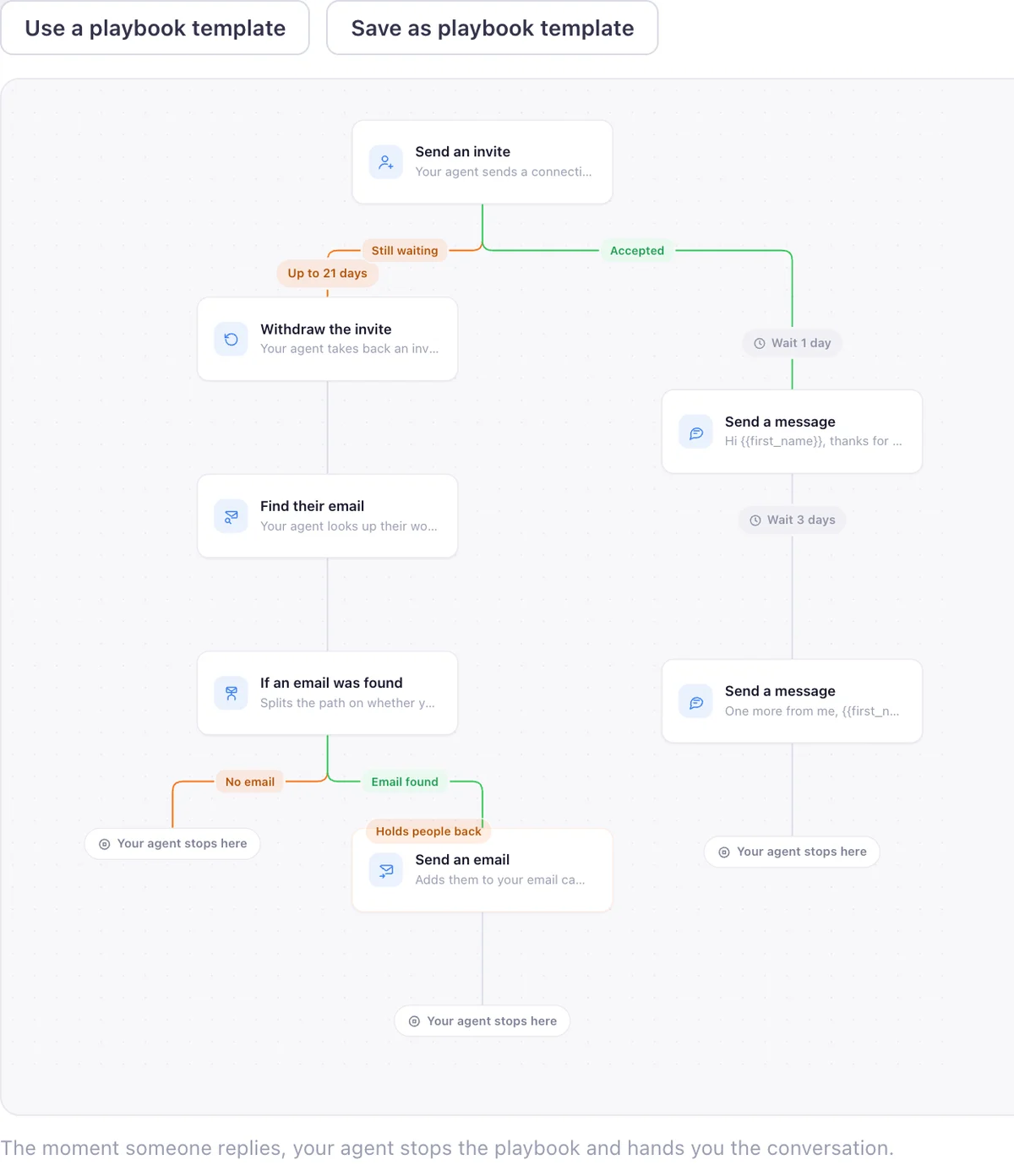
Finds warm buyers on LinkedIn from what they just did, writes the invite and the follow up in your voice, and runs the outreach inside the campaigns and limits you set. Review every message, or let it run.
| Tool | Plan | Price | What it buys | Billing | Read on |
|---|---|---|---|---|---|
| AiSDR | Solo | $250 | per month, 200 AI-researched contacts | monthly | 2026-09-26 |
| AiSDR | Explore | $900 | per month, 800 AI-researched contacts, quarterly contract | quarterly, paid in advance | 2026-09-26 |
| AiSDR | Scale | $2,500 | per month, 2,500 AI-researched contacts, quarterly contract | quarterly, paid in advance | 2026-09-26 |
| Gojiberry | Pro | $99 | per month, 2 AI agents, up to 1,800 prospects contacted | monthly | 2026-09-15 |
| Valley | Starter | $199 | per seat per month, LinkedIn only | monthly | 2026-09-26 |
| Valley | Plus | $299 | per seat per month, LinkedIn plus 1,000 email messages | monthly | 2026-09-26 |
| Smartlead | Base | $39 | per month, 6,000 email sends | monthly | 2026-09-26 |
| Instantly | Growth | $47 | per month, unlimited email accounts, 5,000 emails | monthly | 2026-09-26 |
| Instantly | Starter bundle | $94 | per month, adds a 450M+ lead database and an AI Sales Agent | monthly | 2026-09-26 |
| Lemlist | Multichannel, the plan with LinkedIn | $109 | per user per month | monthly | 2026-09-15 |
| EaseClaw | Pro | $99 | per month, one LinkedIn account per person | monthly | 2026-09-26 |
| EaseClaw | Business | $199 | per month, one LinkedIn account per person | monthly | 2026-09-26 |
Where does EaseClaw fit into this?
I am Pritesh Mann, the founder of EaseClaw, and it leads the fourth lane above, the only lane it appears in. EaseClaw is the AI agent that finds warm buyers on LinkedIn and runs outreach for founder-led B2B companies, without building prospect lists by hand. Built for founders and small B2B sales teams selling high-value products or services, especially when there is no dedicated SDR. Unlike the email-first lane, its only channel is a connected LinkedIn account. Unlike the sequencers, it decides who is worth writing to itself, from signals such as competitor engagement, a job change, a public request for a recommendation, or a company hiring for the problem you solve. It writes the invite and the first message per person in your voice, waits for the accept, then sends the follow up. Review every message, or let it run.
It is the right purchase in one specific case: you are one founder or a small team doing your own selling on one LinkedIn account each, and the part of an AI SDR you actually want is the list building and the first draft, not a phone channel, not InMail, and not a rotation of client accounts. If any of those three are the job, one of the other eight tools on this page fits better than EaseClaw does.
Questions
What is an AI SDR?
What does an AI SDR actually do differently from a human SDR?
Is an AI SDR the same thing as LinkedIn automation software?
How much does an AI SDR cost?
What should you never hand an AI SDR?
Can an AI SDR fully replace a human SDR?
Is EaseClaw an AI SDR?
What EaseClaw looks like
Our product, so you can see what the agent actually runs. Screens from the real app with demo data, and one illustration, labelled as such.
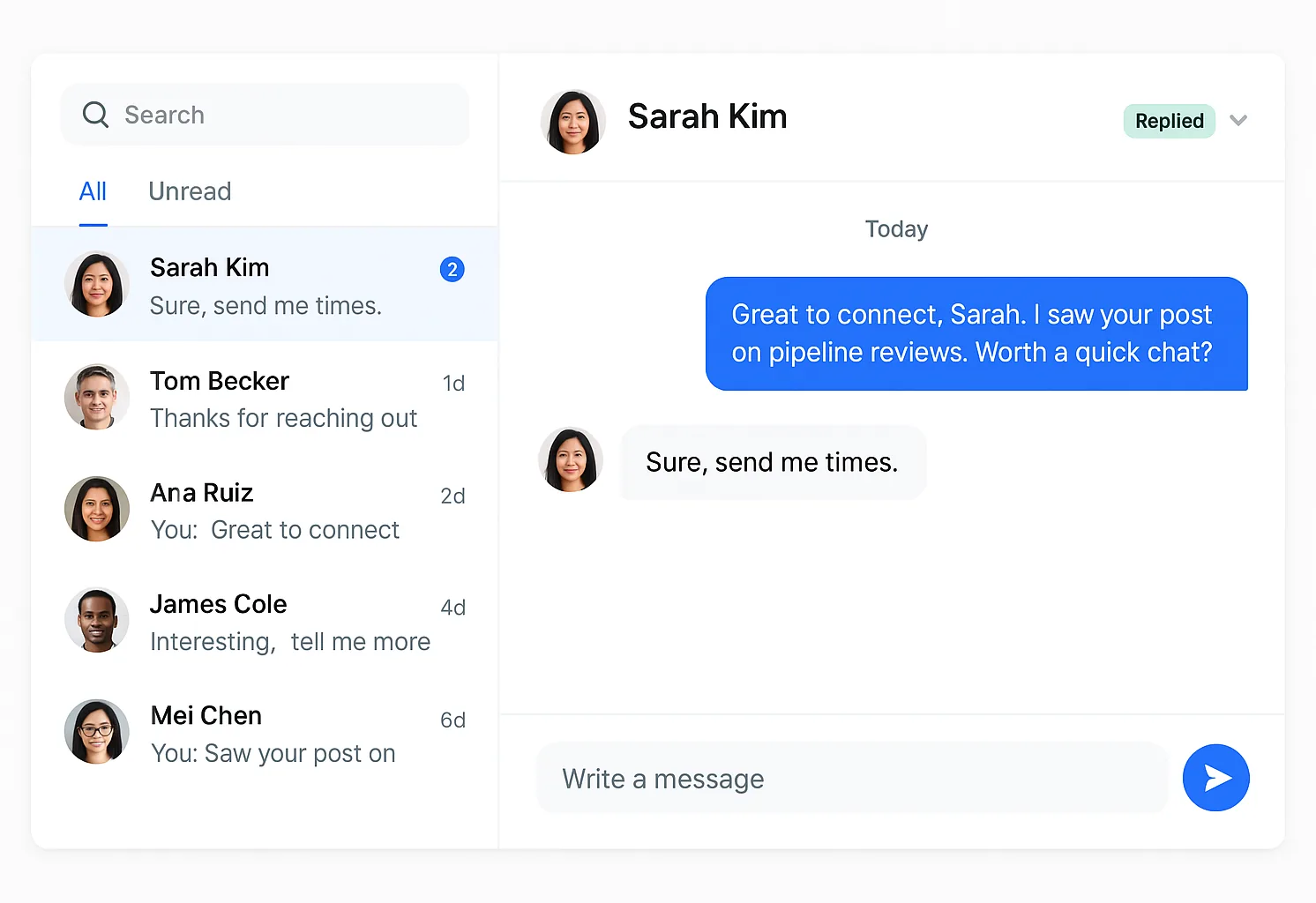
What if the research and the first draft arrived already done?
Paste your website. Your agent works out who is worth an invite from what they just did on LinkedIn, writes the note and the follow up in your voice, and runs it inside the limits you set. Seven days free, no card, then pick a plan to keep going.