
LinkedIn cold outreach: templates, notes and timing that work
LinkedIn cold outreach is a connection request and a follow up sent to someone who has not spoken to you before. It works better when it is not actually cold: LinkedIn caps personalized notes at three a month and 200 characters each, so this guide shows you where to spend that allowance, nine templates to send with or without one, and how to tell whether any of it is working.
What is the difference between warm and cold LinkedIn outreach?
Warm outreach is sent to someone who already did something that shows they are worth writing to: they commented on your post, engaged with a competitor’s page, changed jobs into a role that owns your problem, or asked in public for a recommendation. Cold outreach is sent to someone who has done none of those things, and the message has to work harder because there is no shared context to open with. Both are worth running. The mistake is treating them the same way and sending the identical note to a stranger and to someone who just commented on your post, when the second person deserves a message that says so.
A third party dataset makes the gap concrete: Reachium tracked 14,752 comments on LinkedIn posts and found that a connection request sent to someone who had just commented was accepted 56% of the time, against 27% for a cold request, roughly double. That number is Reachium’s, not ours, and it is the clearest evidence that the trigger you open with matters more than the wording around it.
Should you send a note with your connection request?
Only on your warmest few, because LinkedIn rations the option. Its own help page on personalizing invitations, read 26 September 2026, states that a standard member “can add a personalized message to up to three connection requests per month”, each capped at 200 characters, and that Premium removes the monthly cap on notes while ordinary connection request limits still apply. That is roughly thirty words per note, three times a month, for anyone not paying for Premium.
The practical answer is to default to no note and save the three you get for the strongest triggers you have that month: a comment on your own post, a job change into a role that owns your problem, or someone asking in public for exactly what you sell. For everyone else, send a plain request and put the personal detail in the first message once they accept, where there is no character limit at all. That is also the shape LinkedIn’s own scarcity nudges you toward: it is not designed for a personal note on every single request.
How many LinkedIn connection requests can you actually send?
LinkedIn does not publish an exact daily or weekly number, and that is deliberate rather than an oversight. Its help page on invitation restrictions, read 26 September 2026, names two triggers instead of a number: sending many invitations in a short amount of time, and having many invitations ignored, left pending, or marked as spam by the people who received them. The same page says most restrictions are automatically removed within about a week, and describes an escalating pattern rather than a fixed penalty: a first restriction can mean a wait of a few hours, more than one in a day can mean a wait of a few days, and too many outstanding pending invitations can mean waiting up to a month.
A second help page, on the invitation limit itself, adds one detail worth knowing before you hit it: withdrawing your pending invitations after a restriction is already in place does not remove that restriction. The practical read is to send at a steady, human pace rather than in bursts, keep an eye on how many invitations sit unaccepted, and slow down the moment your acceptance rate drops, rather than aiming at a specific number nobody at LinkedIn will confirm.
Nine connection request templates, by trigger
Each one is written to fit inside LinkedIn’s 200 character note limit, and each is built around a specific reason for reaching out rather than a generic opener. Swap the bracketed placeholders for the real detail, and read the note back before sending it: a placeholder left in the message is worse than sending no note at all.
Hi [First name], thanks for the comment on my post about [topic]. Sounds like you're dealing with the same problem. Would be good to connect.
Hi [First name], saw your comment on [Competitor]'s post. I work on the same problem from a different angle and would like to connect.
Congrats on the move to [Company], [First name]. A new role usually means new priorities. Would like to connect and hear how it's going.
Hi [First name], saw your post asking for recommendations on [topic]. I work in that space and would like to connect and share what I've seen.
Hi [First name], we're both in [Group]. I work with [ICP] on [problem] and thought it was worth connecting.
Hi [First name], noticed [Company] is hiring for [role]. That usually means [problem] is on the roadmap. Would like to connect.
Hi [First name], [Referrer] suggested I reach out. We're both focused on [topic] and I think it's worth a quick connect.
Hi [First name], I work with [ICP] on [problem], and your background at [Company] caught my eye. Would like to connect.
Hi [First name], I write about [topic] for [ICP]. Your work at [Company] looks relevant. Would like to connect and follow along.
A tenth option belongs on this list without a template attached to it: sending no note at all. LinkedIn’s own limit means most of your requests will not carry one anyway, and a plain request with no note performs perfectly well once the trigger is warm enough. Save the note itself for the handful of cases above where the extra thirty words genuinely change whether the person recognizes why you reached out. If you want a second pair of eyes on a note before it goes out, the free LinkedIn networking message generator and the outreach message grader both work from the same trigger types listed above.
What should your first message say once they accept?
This is where the real personalization lives, because a message you send after someone accepts your invite carries no character limit. Say why you reached out in terms that mean something to them, name the problem you help with in one plain sentence, and ask a genuine question instead of pitching a call in the first line. Two versions cover most cases: one for a warm trigger, one for a cold connection you are now following up on for the first time.
Thanks for connecting, [First name]. I work with [ICP] on [problem], mostly around [specific pain]. Curious how you're handling that at [Company] right now, is it something you're actively working on, or lower down the list?
Hey [First name], appreciate the connect. Saw you're at [Company]. We help teams like yours with [problem], mainly through [one line value]. Would a short call make sense, or is this not on your plate right now?
How do you follow up without becoming annoying?
Give the first message a few days before following up. Most replies land inside that window, and a same day nudge reads as pressure rather than persistence. If a second attempt roughly a week later still gets nothing back, send one last message that gives the person an explicit, easy way to opt out, then stop. Two or three total touches after the first message is a sensible ceiling before moving on to someone else.
Hi [First name], following up in case my note above got buried. Still keen to hear how [Company] is approaching [problem], no pressure either way.
Hi [First name], last note from me on this. If [problem] isn't a priority right now, all good, feel free to ignore. If it is, happy to share what's worked for similar teams.
What actually moves acceptance and reply rates?
Three numbers worth knowing before you judge your own results. The first is a third party measurement of the warm versus cold gap; the second and third are ours, and they explain why a warm list is worth the extra step of building it.
Track your own numbers the same way: acceptance rate by trigger type, not one blended figure for everything you send. A cold list dragging down the average of a genuinely warm segment is the most common way a working channel gets judged as broken. If you want a fuller method for building the warm list in the first place, the warm lead system walks through it step by step, and the free LinkedIn outreach planner turns the templates above into a week by week send schedule.
What tools can actually help you send this?
A template is only half the job. Eight tools cover the sending side, grouped by who each one fits, with pricing re-read against the vendor’s own page.
| Tool | Best for | Key capability | Price | Free tier or trial |
|---|---|---|---|---|
| Linked Helper | A single account, budget conscious sender who is comfortable running a desktop app. | The widest LinkedIn action list at the lowest entry price of any tool here. | $15 per license per month, $8.25 on a twelve month term | No free tier. Fourteen day trial with the full feature set. |
| Waalaxy | A first attempt at LinkedIn outreach before committing a monthly budget to it. | A genuinely free tier, capped low, to try the whole idea before paying anything. | EUR 19 per user per month, free tier available | Yes, a capped free tier with no time limit, plus a fourteen day trial on the paid plans. |
| HeyReach | A team or agency sending from several LinkedIn accounts at once. | Rotates sending across every account you connect, and does not charge extra for teammates using them. | $79 per LinkedIn sender per month | No free tier. A trial is offered on request. |
| Expandi | Experienced senders who want branching logic without installing anything. | Sequences that branch on ten different conditions, so the next step depends on what the person actually did. | $99 per LinkedIn account per month, $79 on the annual plan | No free tier. Seven day trial. |
| Skylead | Teams who want LinkedIn and high volume email under one flat bill. | Unlimited connected email accounts and email warm up sitting beside the LinkedIn steps. | $100 per seat per month | No free tier. Seven day trial. |
| Dripify | An individual or a small team who wants one straightforward sequence tool covering both channels. | A wide LinkedIn action list plus a built in, metered email finder. | $59 per user per month, $39 on the annual plan | No free tier. Seven days, no card required to start. |
| Lemlist | Teams where email is the main channel and LinkedIn is the second one. | A high email volume allowance with LinkedIn steps in the same sequence. | $109 per user per month for the plan that includes LinkedIn | No free tier. A fourteen day trial, no card required. |
| EaseClaw our product | Founders and small B2B teams doing their own selling, who want the work of deciding who to write to taken off them. | Works out who is worth writing to from your own website, then writes and runs the outreach to them. | Pro $99 a month, Business $199 a month. | Free for 7 days, no card required. Pick a plan after that to keep going, cancel anytime. |
Best for a single account on a budget
You send from one LinkedIn account and want the cheapest real way to run sequences against a list you already have.
A desktop application that runs connection requests, messages and follow ups from your own machine, with the widest action list of any tool at this price.
A browser extension with a free tier that never expires, plus paid tiers that add volume and an email step.
Best for scaling sends across many accounts
You or your team send from several LinkedIn accounts and want one dashboard and one bill across all of them.
Cloud sending built around rotating several connected LinkedIn accounts into one shared inbox and one bill.
Cloud sending with a country pinned connection per account and the deepest conditional sequence builder of the group.
Cloud sequences that mix LinkedIn steps with a high volume email side under the same flat seat price.
Best for pairing LinkedIn with email in one sequence
LinkedIn is one step in a wider sequence that also emails the same person, on the same schedule.
A per seat cloud sequencer with connection requests, messages, profile actions and email steps in one flow, and a metered email finder built in.
Email first, with LinkedIn steps added on its multichannel plan: connection requests, messages and voice notes alongside a large email allowance.
Best for founder-led warm-buyer discovery
You do not want to build the list. You want the people found from what they just did, then written to.
Finds warm buyers on LinkedIn from what they just did, writes the invite and the follow up in your voice, and runs the outreach inside the campaigns and limits you set. Review every message, or let it run.
| Tool | Plan | Price | What it buys | Billing | Read on |
|---|---|---|---|---|---|
| Linked Helper | Standard, local storage | $15 | per license per month | monthly | 2026-09-15 |
| Waalaxy | Pro | EUR 19 | per user per month | monthly | 2026-09-15 |
| HeyReach | Growth | $79 | per LinkedIn sender per month | monthly | 2026-09-15 |
| Expandi | Business | $99 | per LinkedIn account per month | monthly | 2026-09-15 |
| Skylead | All in one | $100 | per seat per month | monthly | 2026-09-15 |
| Dripify | Basic | $59 | per user per month | monthly | 2026-09-15 |
| Lemlist | Multichannel, the plan with LinkedIn | $109 | per user per month | monthly | 2026-09-15 |
| EaseClaw | Pro | $99 | per month, one LinkedIn account per person | monthly | 2026-09-26 |
| EaseClaw | Business | $199 | per month, one LinkedIn account per person | monthly | 2026-09-26 |
Where does EaseClaw fit into this?
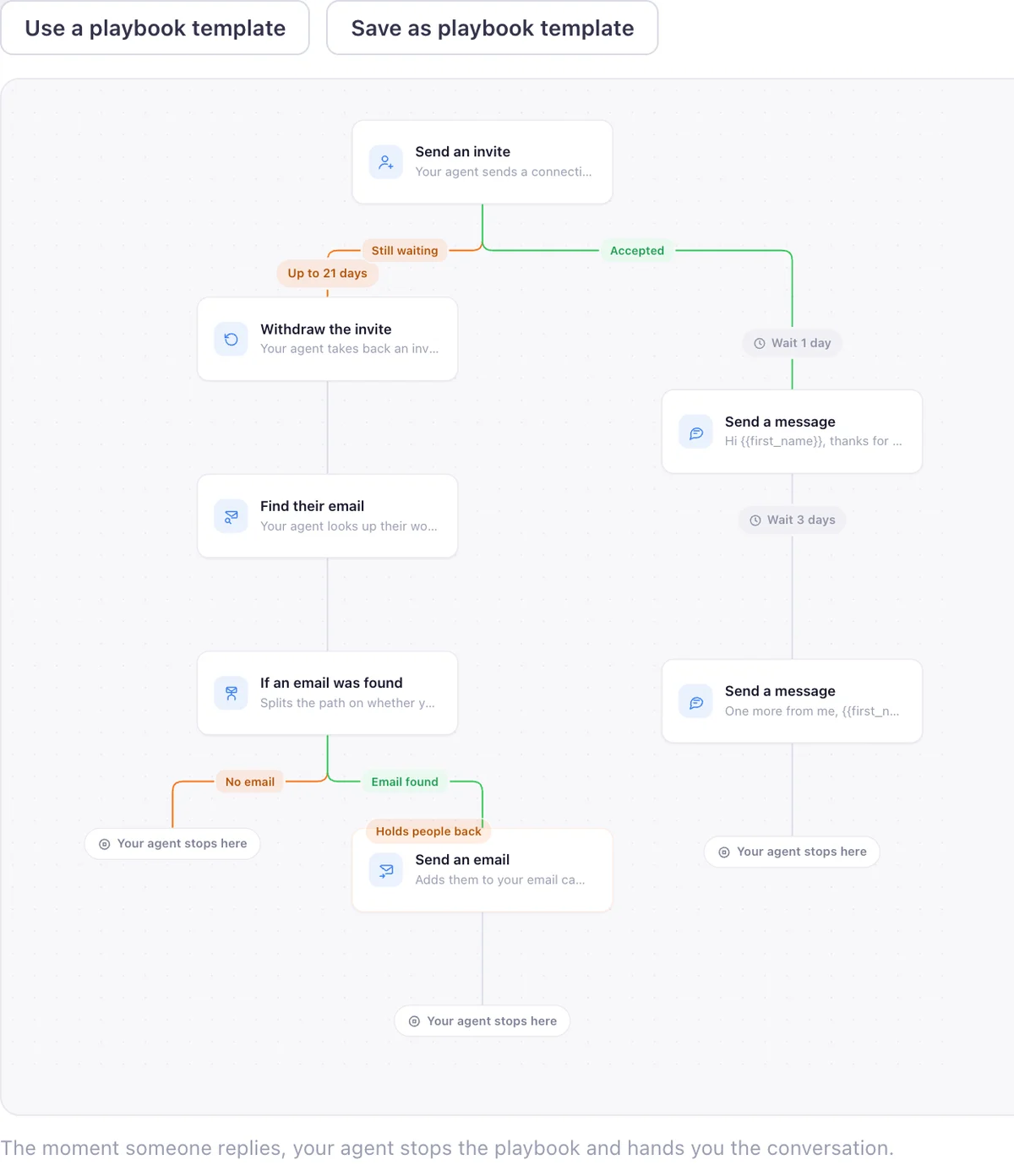
I am Pritesh Mann, the founder of EaseClaw, and it is the entry in the fourth lane above. EaseClaw is the AI agent that finds warm buyers on LinkedIn and runs outreach for founder-led B2B companies, without building prospect lists by hand. Built for founders and small B2B sales teams selling high-value products or services, especially when there is no dedicated SDR. Instead of you deciding who gets the three notes a month, it finds the people worth writing to from buying signals: engagement on a competitor’s posts, a job change, someone asking for a recommendation, a company hiring for the problem you solve. It writes the invite and the first message per person in your voice, waits for the accept, then sends the follow up. Review every message, or let it run.
It is the right purchase in one specific case: you run one LinkedIn account, you do your own selling, and the part of this guide you would rather not do by hand every week is deciding who the nine templates above should go to. If you already have a list and want to run sequences against it yourself, one of the other seven tools on this page is the better fit.
Questions
What is LinkedIn cold outreach?
Should I send a note with my LinkedIn connection request?
How many LinkedIn connection requests can I send per day or week?
What should my first message say after someone accepts my invite?
How long should I wait before following up on LinkedIn?
What counts as a good LinkedIn connection request acceptance rate?
Is LinkedIn automation software the same thing as an AI outreach agent?
What EaseClaw looks like
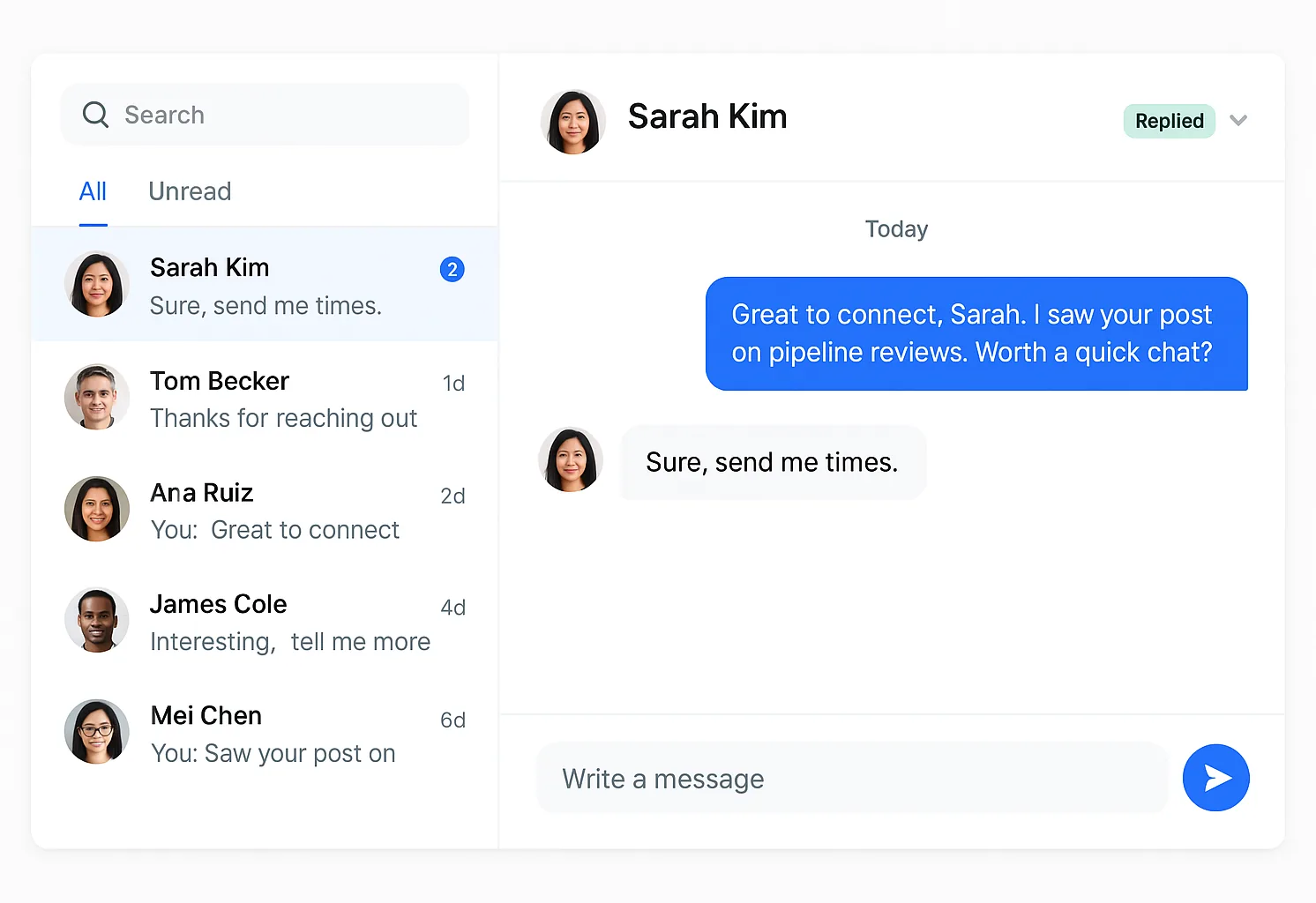
Our product, so you can see what the agent actually runs. Screens from the real app with demo data, and one illustration, labelled as such.
What if the list of who to send these to arrived already built?
Paste your website. Your agent works out who is worth an invite from what they just did on LinkedIn, writes the note and the follow up in your voice, and runs it inside the limits you set. Seven days free, no card, then pick a plan to keep going.