
Dripify alternative: warm buyers instead of drip sequences
Dripify is a sequence builder for LinkedIn and email. You load a list, you draw the steps, it runs them. EaseClaw is an AI agent for LinkedIn outreach. It reads your website, works out who should buy from you, finds those people, and writes to them. I have not run Dripify myself. Every Dripify fact below comes from its own documentation, help centre, pricing page and public reviews on Trustpilot and Capterra, read on 8 September 2026.
Gives you the sequence. You bring the audience and the copy, and it works through the steps for you.
Gives you the audience. It learns your offer from your site, finds the people who fit it, and drafts what to say to each one.
7 days free · cancel anytime · then $99 a month
What Dripify does, and what it does not decide
Dripify runs in the cloud, so there is nothing to install and no browser extension in the loop. You point it at a LinkedIn or Sales Navigator search, an Events list, a Group, a CSV of profile URLs, or the people who liked and commented on a post. Then you drag the steps into a campaign: view the profile, follow, endorse a skill, invite, message, InMail, email. It has been shipping fast, with teams and roles in April 2026, engager collection in May, a Sales Navigator InMail action in July, and A/B testing in August.
One claim to retire before it spreads. Collecting the people who engaged with a competitor post is not something only EaseClaw does. Dripify added exactly that in May 2026, across your own posts, sponsored posts, competitor company posts and public posts by other people, capped at 3,000 leads from likes and 500 from comments. If you read a comparison saying competitor-post sourcing belongs to one tool, including ours, it is out of date. Our ranked list of LinkedIn automation tools says the same thing about several of them.
The real split is what happens to those names next. Dripify hands you the raw list to sequence. EaseClaw builds a picture of your ideal customer from your website, keeps only the people who match it, and drafts a message to each one about the reason they surfaced. Everything else on this page follows from that one difference.
Pick Dripify if you already have the audience and want more ways to work it: more step types, email in the same sequence, teams and roles, A/B testing, and a way in from $39 per user per month billed annually. Pick EaseClaw if the audience is the hard part. You paste your site, the agent finds the warm buyers, drafts the invite and the follow-up in your voice, and keeps the campaign running while you take calls. Review every message, or let it run.
EaseClaw compared with Dripify, row by row
Read the rows where we come off worse as carefully as the rest. They are the reason a lot of people should buy Dripify.
| Dripify | EaseClaw | |
|---|---|---|
| How the list gets built | You build it. A LinkedIn or Sales Navigator search, pasted profile URLs, a CSV of profiles, Events, Groups, or the people who liked and commented on a post. | You paste your website. The agent works out what you sell and who should buy it, then goes and finds those people, and keeps finding more. |
| Who writes each message | You write the sequence once. More than twenty variables and an AI icebreaker fill in the gaps for each lead. | The agent drafts the invite and the follow-up for each person, in your voice, from the signal that surfaced them. |
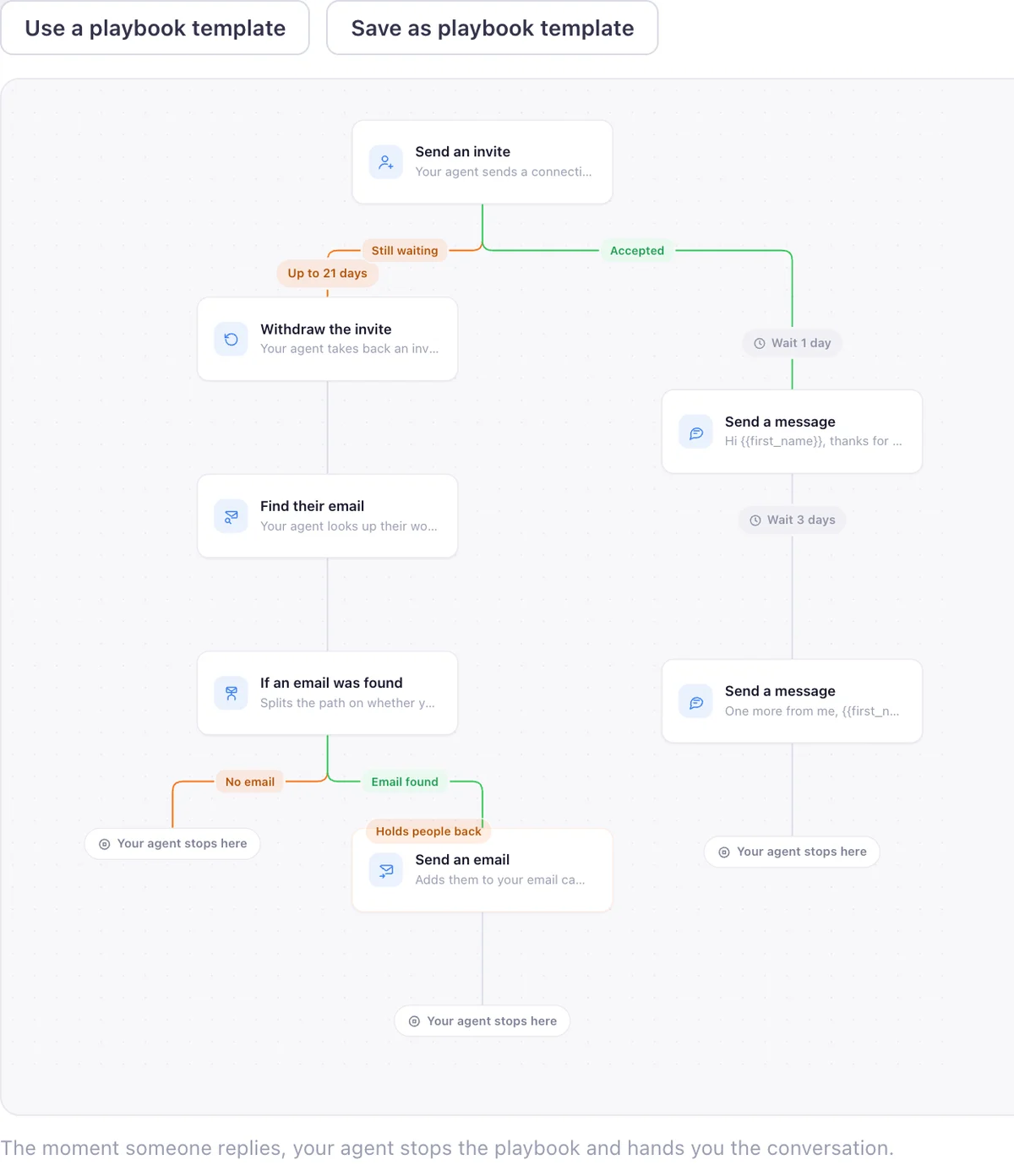
| Steps in one campaign | More than ten actions in a drag and drop builder: view profile, follow, like a post, endorse skills, invite, message, InMail, email and unfollow. | One play: the invite, the wait for the accept, then the first message and the follow-ups. No InMail, no endorsements, no profile visits. |
| Email follow-up | Built in. An email finder, a verifier, email steps beside the LinkedIn steps, per-step delivery reporting, and reply detection from Gmail and Outlook. | No email sending of our own. People who never reply can be handed to Instantly for the email follow-up, and only if you switch that on. |
| Seats and teams | Priced per user per month. Multiple teams with owner, manager and user roles, a shared dashboard, shared templates and cross-team duplicate protection. | One connected LinkedIn account per workspace. No agency dashboard, no client reporting, no white label. |
| Who approves what goes out | You approve the sequence once. It then runs against the list you loaded until you pause it or the leads run out. | Copilot puts the batch in front of you before anything goes out. Autopilot approves inside the campaign you set up. |
| What it costs to start | $59 per user per month, or $39 per user per month billed annually, read from the pricing page on 2026-09-08. | $99 a month, or $950 for a year paid up front. Free for the first 7 days on either plan. A card is taken at sign-up and nothing is charged until day 7. |
| For developers and AI agents | An API, webhooks, Zapier, Make and HubSpot. One webhook trigger sends the entire LinkedIn conversation to your own system. | An MCP server, a REST API and a CLI that read leads and draft messages. The machine surface never sends. |
What Dripify and EaseClaw cost, plan by plan
Dripify prices per user per month and shows a lower rate when you pay for the year. Its pricing page never states how many LinkedIn accounts a seat covers, so do not assume one each. Every figure below was read from the two pricing pages on 8 September 2026, and prices change without notice. The date in the last column is a link to the page the figure came off, so you never have to take one of these numbers from me.
| Tool | Plan | Price | What it buys | Billing | Read on |
|---|---|---|---|---|---|
| Dripify | Basic | $59 | per user per month | monthly | 2026-09-08 |
| Dripify | Basic | $39 | per user per month | billed annually | 2026-09-08 |
| Dripify | Pro | $79 | per user per month | monthly | 2026-09-08 |
| Dripify | Pro | $59 | per user per month | billed annually | 2026-09-08 |
| Dripify | Advanced | $99 | per user per month | monthly | 2026-09-08 |
| Dripify | Advanced | $79 | per user per month | billed annually | 2026-09-08 |
| Dripify | Enterprise | Custom | not published | contact sales | 2026-09-08 |
| EaseClaw | Pro | $99 | per month | monthly | 2026-09-08 |
| EaseClaw | Pro | $950 | per year | billed annually | 2026-09-08 |
| EaseClaw | Business | $199 | per month | monthly | 2026-09-08 |
| EaseClaw | Business | $1,910 | per year | billed annually | 2026-09-08 |
Both trials run 7 days. Dripify says at signup that it asks for no card, which I could not check without opening an account. EaseClaw takes a card at sign-up and charges nothing before the seventh day; cancel any time before then and you pay nothing.
Where Dripify is better than EaseClaw
Six things, all checked against Dripify documentation on 8 September 2026. If two or three of them matter to you, buy Dripify and stop reading.
Dripify runs view profile, follow, like a post, endorse skills, the invite, messages, InMail and unfollow inside one campaign, and a Sales Navigator InMail action shipped in July 2026 to reach people outside your network. EaseClaw does none of those. If your play depends on a profile visit before the invite, Dripify has it and we do not.
CSV upload, pasted profile URLs, LinkedIn search, Sales Navigator, Recruiter, Events and Groups all feed a Dripify campaign, and a Sales Navigator import carries up to 2,475 profiles. EaseClaw has no CSV upload of prospects into a campaign yet, so a list you already paid for has nowhere to go.
Dripify shipped multiple teams in April 2026 with owner, manager and user roles, a live dashboard showing acceptance and response rates, shared templates, and protection against two teammates working the same lead. EaseClaw is one LinkedIn account per workspace, so none of that exists here.
Dripify finds and verifies work emails, runs email steps beside the LinkedIn steps, reports sent, delivered and bounced per step, and pauses a lead when they reply in Gmail or Outlook. EaseClaw sends no email itself. It passes the people who never replied over to Instantly, which is a second tool to pay for and learn.
Dripify Basic is $39 per user per month billed annually against $99 a month for EaseClaw Pro. Dripify also arrives with 519 Trustpilot reviews averaging 4.6 and 477 Capterra reviews averaging 4.7, both read 2026-09-08. EaseClaw is a 2026 product with no review history for you to read yet.
On the Advanced plan Dripify tests up to three variants of the same message action and reports on each one, in Beta since August 2026. EaseClaw has no A/B testing. If you want to prove one opener beats another before you scale it, Dripify gives you the mechanism today.
Where EaseClaw is better than Dripify
One thing, done end to end. You paste your website and the agent learns what you sell and who should buy it. Then it goes looking: people engaging with your competitors, people who just changed jobs, people asking for a recommendation, companies hiring for the problem you solve, people commenting on your own posts. It writes the invite and the follow-up in your voice for each of them, waits for the accept, then sends the first message. Replies land in one inbox, and meetings are the number we track.
You choose how much of that you watch. Copilot puts the whole batch on screen before anything goes out. Autopilot approves inside the campaign you set up, so it runs while you are selling. Either way it is the campaign you built, and outreach never happens outside one you created.
Why start from a signal rather than a search filter? Reachium, tracking 14,752 comments, published an invite acceptance rate of 56% from people who had just commented on your post against 27% cold, a figure I read on 5 September 2026. That is their number, not ours, and it is the reason the agent starts with what somebody just did. The rest of the stack is small on purpose: an MCP server, a REST API and a CLI that read leads and draft messages, and 67 free sales tools such as the LinkedIn outreach planner that need no signup at all.
What we found when we pulled competitor engagers ourselves
These are figures from our own outreach ledger, not an industry study, and not a claim about what your campaigns will do.
The 17% matters here. Dripify hands you the engager list as it comes off the post, and on our own harvests roughly one in six of those people sold a competing tool. Somebody has to throw those out, and a picture of your ideal customer does it before a message is ever drafted. The full ledger, with the date each figure was read:
- Competitor and creator posts we pulled the engagers from: 44 posts from 14 creators. Source: EaseClaw harvest ledger, marketing/harvests/engager-ledger.json, as of 2026-09-08.
- Unique people who had engaged with those posts: 1,672. Source: EaseClaw harvest ledger, marketing/harvests/engager-ledger.json, as of 2026-09-08.
- Those engagers who were vendors selling a rival tool: 286 of 1,672, or 17%. Source: EaseClaw harvest ledger, people marked as vendors, as of 2026-09-08.
- What it cost us to pull 1,434 engager profiles: $3.37, about a quarter of a cent per person. Source: EaseClaw harvest ledger, counters for 2026-08-06 to 2026-08-10, as of 2026-08-10.
- One wave of seven posts, engagers with a valid work email: 106 emails for $5.13. Source: EaseClaw harvest wave, the import file built on 2026-09-03, as of 2026-09-03.
- Posts we read before 125 genuine buyers came out of them: 34,116 read, 5,789 scored, 125 buyers. Source: easeclaw.com/research/buying-intent-2026, as of 2026-08-04.
The wider view sits on our buying-intent research page: 34,116 posts read, 5,789 scored, 125 people who turned out to be genuine buyers, as of 4 August 2026. Real buyers are rare, which is exactly why the list you start from decides the campaign.
The same discipline on price, using only the figures in the table above, read on 8 September 2026. The cheapest year on Dripify is Basic billed annually, $39 x 12, which is $468 per user. Dripify Advanced billed annually is $79 x 12, which is $948 per user. EaseClaw Pro billed annually is $950 for the year, two dollars more than Dripify Advanced. Paid monthly the two are level at $99. Three people on Dripify Advanced comes to $297 a month, or $237 a month billed annually, which is $2,844 for the year. There is no matching EaseClaw number, because one workspace connects one LinkedIn account and three seats is not a product we sell today.
What Dripify customers say in public reviews
Read on 8 September 2026: Trustpilot shows 4.6 from 519 reviews, Capterra 4.7 from 477, with Value for Money its lowest scored category at 4.29. The praise is consistent about reliability and time saved.
“Dripify is effective and easy to configure. I’ve tried a couple other LinkedIn automation tools, but Dripify has been reliable” (Trustpilot, 5 stars, 31 August 2026). “It helps to automate a time-consuming process, which saves me about 2 days per month (12-16 hours)” (Capterra, Chris T., 5 stars, November 2024).
The complaints cluster on price and on the first week. “value just isn’t there for the price” (Trustpilot, Phil P., 1 star, 11 March 2026). “no clear guidance, and the platform assumes you already know how everything works” (Trustpilot, Muskan, 1 star, 6 April 2026). “Basic package is VERY limited. Only 1 campaign permitted which can’t be edited or archived” (Capterra, Richard L., 3 stars, July 2025). That last one is worth planning around: the cheapest Dripify plan runs a single campaign.
Other Dripify alternatives worth a look
All four prices below were read on 8 September 2026, and none of these tools has been run by me either.
- HeyReach charges per LinkedIn sender rather than per user, from $79 a month for one sender, which is the shape an agency running client accounts actually needs. Our HeyReach comparison has the full per-sender table.
- Expandi sells a single Business plan at $99 per seat a month with a 7 day free trial, plus a custom Agency tier from ten seats that adds white label and client reporting.
- Waalaxy starts at 19 euro per user a month on Pro and pairs a browser extension with a cloud app, with a 14 day free trial, which suits people who want to stay close to the browser.
- La Growth Machine bills per identity, one seat covering LinkedIn, email and Twitter together, from 60 euro a month billed annually with a 14 day free trial.
Which one is actually right for you
- Deciding who to write to is the part that eats your week.
- You run one LinkedIn account and you are the person selling.
- You want the invite and the follow-up written per person, in your voice.
- You want it running while you are on calls, with or without a batch to review.
- You want your coding agent to read leads and draft over MCP.
The playbook behind all of it is free to read: the warm lead system is the same method the agent runs.
- You already own the list and just need it worked properly.
- You need InMail, endorsements, follows or profile visits as steps.
- You need email in the same sequence as the LinkedIn steps.
- You have a team and need roles, a shared dashboard and duplicate protection.
- You want to A/B test two versions of a message before scaling it.
Those are real gaps on our side, and no trial of ours will close them this quarter.
Questions people ask before switching
Is EaseClaw a good Dripify alternative?
Can Dripify pull the people who engaged with a competitor post?
Can I upload my existing prospect list to EaseClaw?
Which one costs less over a full year?
Does EaseClaw send email follow-ups the way Dripify does?
I run outreach for several clients. Which should I choose?
What EaseClaw looks like
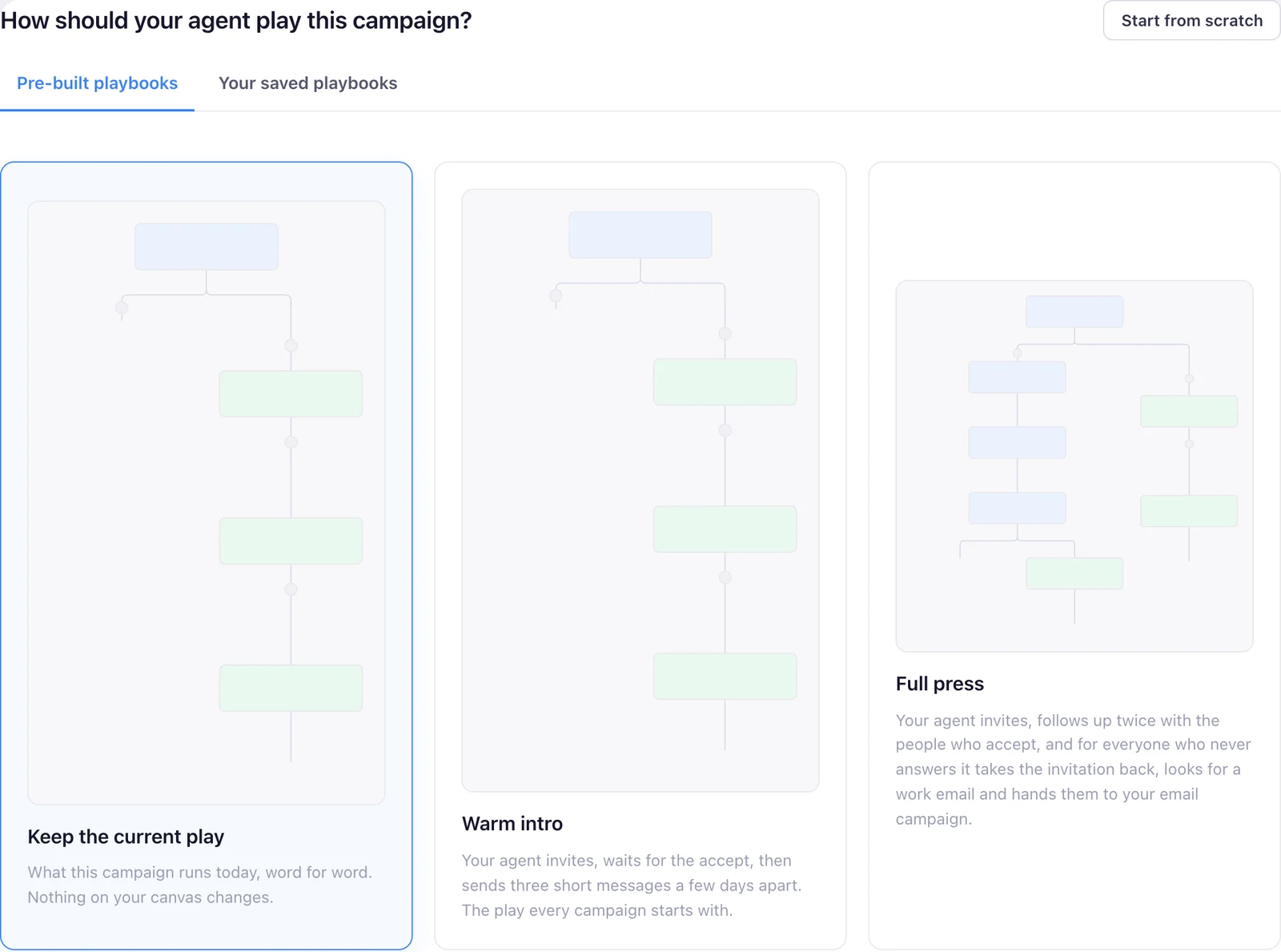
Our product, so you can see what the agent actually runs. Screens from the real app with demo data, and one illustration, labelled as such.
Stop building lists. Start meeting buyers.
Paste your website and your agent finds the people already showing they want what you sell, then writes to them in your voice.
7 days free · cancel anytime · then $99 a month