
HeyReach alternative for founders who run one LinkedIn account
HeyReach is built for agencies rotating many LinkedIn accounts, and it is good at that. EaseClaw is one AI agent working one founder’s account. It finds the warm buyers, writes the invite and the follow-up in your voice, and books the meeting. Below: where HeyReach is stronger, every price with the date it was read, and the arithmetic on per sender billing.
I have not run HeyReach. Its facts here come from HeyReach’s own documentation, pricing page and public reviews, read on 2026-09-08.
Connect many LinkedIn accounts, load the list you built somewhere else, and rotate sending across every sender in one campaign.
One account. Your agent finds the warm buyers, writes to them in your voice, and tracks the meeting at the end. Review every message, or let it run.
If you run outreach for clients, or you have several reps who each need their own sender inside one campaign, stop reading and take HeyReach. Nothing on this page beats it at that, and EaseClaw cannot do it at all.
If you are one founder with one LinkedIn account, per sender billing buys you nothing. It is a pricing model built to make the tenth and the fiftieth sender cheap, and you have one. And the hard part was never sending the invites. It was working out who deserved one. That is the part EaseClaw does: it reads your website, builds an ideal customer profile from it, and goes looking for people who match. If you want both tools in a wider field, the 2026 LinkedIn automation tools roundup ranks ten of them with prices read the same week.
EaseClaw and HeyReach, row by row
Every HeyReach cell is drawn from its own site, help center or blog, read on 2026-09-08.
| HeyReach | EaseClaw | |
|---|---|---|
| What it is built to run | Many LinkedIn accounts on one campaign, with sending rotated between them. The site describes connecting unlimited LinkedIn accounts for one flat fee. | One connected LinkedIn account per workspace. One agent, working one founder's own network. |
| Where the people come from | Lists you bring. The help center describes Sales Navigator searches and saved lists, event attendees, group members, first degree connections, CSV, or a push from Clay, HubSpot, RB2B or Trigify. | Your agent reads your website, builds an ideal customer profile from it, and goes looking for the people who match. |
| Which buying signals it acts on | None built in. HeyReach runs the campaign against whatever list you loaded, and leaves the choosing to you and your other software. | People engaging with a competitor's posts and pages, people who just changed jobs, people asking for recommendations, companies hiring for the problem you solve, people commenting on your own posts. |
| Who writes the message | You do. You build the sequence, the copy and the personalization before the campaign goes anywhere. | Your agent writes the invite in your voice, waits for the accept, then writes the first message and the follow-ups. |
| How outreach gets approved | You build the campaign and launch it, and it runs to the list you loaded. | Copilot puts the batch in front of you before anything goes out. Autopilot approves and sends inside the campaign you set up. |
| Email follow-up | Not native. HeyReach's own alternatives post calls the product LinkedIn only, and multichannel runs through native connections with Instantly, Smartlead and EmailBison. | Not native either. Non-responders can be handed to Instantly for email follow-up, and that handoff is opt-in per campaign. |
| Agency and team features | White-label on your own domain and sign-in page, client workspaces with isolated data, and a shared inbox that keeps a client's private messages private. | None of it. No agency dashboard, no white-label reporting, no client workspaces. |
| Price for one LinkedIn account | $79 per sender per month, or $63 per sender per month if you pay for the year. Read 2026-09-08. | $99 a month on Pro, read 2026-09-08, and free for the first 7 days; a card is taken at sign-up and nothing is charged until day 7. |
| For agents and developers | A Campaign API in beta covering campaigns, inbox management, lead routing and analytics, plus an MCP server and a command line tool. | An MCP server, a REST API and a CLI that read leads and draft messages. The machine surface never sends. Sending runs only inside your campaigns. |
What HeyReach costs, and what one sender really means
HeyReach bills by connected LinkedIn account, not by human. Its pricing page puts it plainly: “HeyReach charges only per LinkedIn senders, not per users.” So a teammate, a virtual assistant or a client can sit in the workspace for nothing, and the bill moves only when you plug in another LinkedIn account. That is a genuinely good deal for an agency, and a strange one for a founder with a single profile.
| HeyReach plan | Price | What it buys | Billing | Read on |
|---|---|---|---|---|
| Growth, under 10 senders | $79 | per LinkedIn sender per month | monthly | 2026-09-08 |
| Growth, under 10 senders | $63 | per LinkedIn sender per month | annual, billed yearly | 2026-09-08 |
| Growth, 10 senders or more | $59 | per LinkedIn sender per month | monthly | 2026-09-08 |
| Micro Agency 25 | $999 | per month for 25 senders | monthly | 2026-09-08 |
| Agency 50 | $1,399 | per month for 50 senders | monthly | 2026-09-08 |
| Unlimited | $2,999 | per month, fair use up to 300 senders | monthly | 2026-09-08 |
| Starter trial | $0 | for 14 days with 3 LinkedIn accounts | card at sign-up, nothing charged until day 7 | 2026-09-08 |
Read from heyreach.io/pricing and its plans help article on 2026-09-08, and the date in each row links to the page that figure came off. Quarterly billing saves ten percent and annual saves twenty, so the numbers above move if you commit for longer.
EaseClaw prices the agent, not the account: Pro at $99 per month for one LinkedIn account, Business at $199 per month for one LinkedIn account. Free for the first 7 days on either plan; a card is taken at sign-up and nothing is charged until day 7. Read from easeclaw.com/pricing on 2026-09-08. If you want to sanity check what any of this buys you, the free LinkedIn outreach planner turns invites a day and your own acceptance rate into a monthly meeting projection, with no signup.
Where HeyReach is better than EaseClaw
Five things it does that we do not. Each one is a reason to close this page.
This is the whole product and it is genuinely good at it. HeyReach describes connecting unlimited LinkedIn accounts for one flat fee and rotating sending between them, and its help center says you can select unlimited senders and assign them to a single campaign. EaseClaw connects one LinkedIn account per workspace, so a four person sales team or an agency cannot do this at all.
The agency page offers white-label with your own logo, colors, domain and sign-in page, client workspaces with isolated data and controlled access, and a shared inbox that keeps a client's private messages private. If you resell outreach, that is the difference between a tool you can put your name on and one you cannot. EaseClaw has none of it.
One sender is $79 a month, or $63 a month on annual billing, against $99 a month for EaseClaw Pro. At fifty senders the Agency 50 plan works out at $27.98 each. If your deciding number is price per connected LinkedIn account, HeyReach wins it, and it is not close.
The integrations page lists Clay, HubSpot, n8n, Zapier, Make, Slack, Instantly, Smartlead, EmailBison, RB2B, Trigify, Breakcold, Attio and Persana, and connections, messages and replies log to HubSpot automatically. EaseClaw's outward path is an MCP server, a REST API, a CLI and an Instantly handoff, which is a much shorter list.
HeyReach campaign steps include connection requests, messages, voice notes, profile views, following, post engagement and InMail, with If Connected branching, and the Campaign API is in beta across campaigns, inbox, routing and analytics. EaseClaw has none of those extra step types, and it does not pretend to.
Where EaseClaw is better for one founder
HeyReach starts after the list exists. Its help center describes list building as importing: a Sales Navigator search, an event attendee list, a group, your first degree connections, a CSV, or a push from Clay or HubSpot. Which means the question that decides whether outreach works, who is worth writing to this week, is still yours to answer, with software you buy separately.
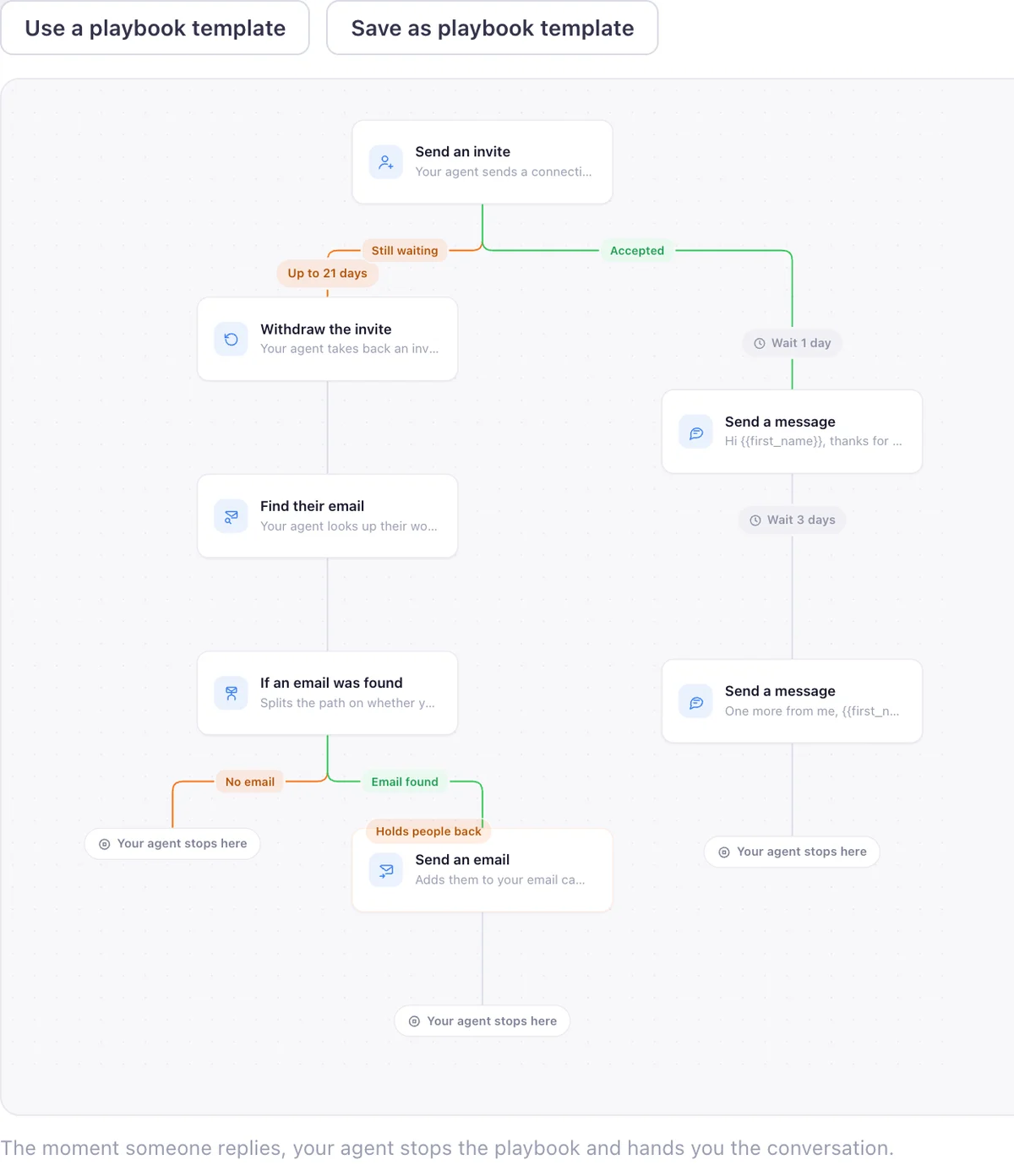
EaseClaw answers it. Paste your website and the agent learns what you sell and who should buy it. Then it finds warm buyers from buying signals: people engaging with a competitor’s posts and pages, people who just changed jobs, people asking for recommendations, companies hiring for the problem you solve, people commenting on your own posts. It writes the invite in your voice, waits for the accept, sends the first message, and follows up. Replies land in one inbox and meetings are the number it tracks.
You choose how much of that you watch. Copilot puts a batch of messages in front of you before anything goes out. Autopilot approves and sends inside the campaign you set up. Non-responders can be handed to Instantly for email follow-up if you want that, and it is off until you turn it on. The whole method, without the software, is written up in the Warm Lead System.
What changed at HeyReach in the last year
HeyReach announced its Campaign API in beta for all users in a post dated 21 April 2026, describing it as reaching every feature: campaigns, inbox management, lead routing and analytics. Alongside it there is an MCP server and a command line tool that covers campaigns, leads, lists, inboxes, accounts, webhooks and workspace settings. For a technical team that wants outreach driven from code, that is a real advantage.
In March 2026 HeyReach’s chief executive published a note about the company’s own presence on LinkedIn. In his words: “LinkedIn recently removed our company page along with a few of our personal profiles (CTO, CRO, CMO).” The same post states HeyReach’s position on what it meant for the product: “This has zero impact on you or the product.” That is HeyReach’s own account, published on heyreach.io/blog/quick-update-from-nick on 25 March 2026. It is the only primary source on the subject, and we draw no conclusion from it about anybody else.
What HeyReach users say, good and bad
HeyReach holds 4.0 out of 5 across 51 Trustpilot reviews, 74 percent of them five star, read on 2026-09-08. The praise clusters on the multi-account job and on support. Vladan U. wrote “Game changer for our agency outbound marketing. Customer support is on point, fast and super helpful” (Trustpilot, 5 stars, 12 January 2026). Kelvin, in staffing, wrote “Being able to automate LinkedIn outreach across unlimited profiles at a fixed cost is a game-changer” (Capterra, 5 stars, 31 October 2024).
The complaints cluster on billing and on support waits. Peter Dragstra wrote “They keep charging me for 4 seats” after asking to scale down (Trustpilot, 1 star, 10 July 2025). Kazi Islam wrote “Their support is getting worse by the day”, citing waits of a day or two (Trustpilot, 2 stars, 18 November 2025). Even the happy Capterra reviewer had a caveat: “The only drawback is keeping the profiles connected consistently, it requires some maintenance” (Capterra, 31 October 2024). These are individual accounts on public review sites, not verified incidents, so read them as opinions with dates on them.
What we measured on our own outreach
Once you have the senders, the question is where the people come from. These are our own numbers from our own harvests, not an industry benchmark.
Pulling those 1,434 profiles cost us $3.37, about a quarter of a cent a person, across harvests run between 6 and 10 August 2026. One later wave of seven posts on a single topic produced 106 valid work emails for $5.13 on 3 September 2026. The lesson we took from it is the one this page is built on: the people are cheap to find and expensive to choose badly. Seventeen percent of everyone who engaged with those posts was another vendor selling a competing tool, and every one of them would have been an invite wasted.
The other two figures are arithmetic on HeyReach’s own published prices, read on 2026-09-08. Three senders on Growth is 3 at $79, which is $237 a month, or $189 a month on annual billing, which is $2,268 for the year. Per sender billing stops being the cheaper route at seventeen senders: 17 at $59 is $1,003 a month, against $999 for Micro Agency 25. Below seventeen senders you are on the per sender rate, and at one sender you are paying an agency tool’s price for a founder’s job.
- Competitor and creator posts we pulled engagers from: 44 posts across 14 creators. Source: EaseClaw harvest ledger, marketing/harvests/engager-ledger.json, as of 2026-09-08.
- Unique people who engaged with those posts: 1,672. Source: EaseClaw harvest ledger, marketing/harvests/engager-ledger.json, as of 2026-09-08.
- Engagers who turned out to be vendors selling a rival tool: 286 of 1,672, or 17 percent. Source: EaseClaw harvest ledger, people marked vendor and excluded, as of 2026-09-08.
- What it cost us to pull 1,434 engager profiles: $3.37, about a quarter of a cent a person. Source: EaseClaw harvest ledger counters, 2026-08-06 to 2026-08-10, as of 2026-08-10.
- Valid work emails from one seven post wave: 106 emails for $5.13. Source: EaseClaw harvest wave, import file 2026-09-02-claude-wave-sep3, as of 2026-09-03.
- What three LinkedIn senders cost on HeyReach Growth: $237 a month, or $2,268 for a year on annual billing. Source: Arithmetic on HeyReach Growth prices at heyreach.io/pricing, as of 2026-09-08.
- Where per sender billing stops being the cheaper route: 17 senders: 17 at $59 is $1,003, against $999 for Micro Agency 25. Source: Arithmetic on HeyReach prices at heyreach.io/pricing, as of 2026-09-08.
The wider study behind these harvests, including how few posts turn out to carry real buying intent, is published at buying-intent conversations: the 2026 data.
Other HeyReach alternatives worth a look
Expandi is cloud LinkedIn automation at $99 per LinkedIn account a month, with a custom Agency plan from ten accounts that adds white-label and role permissions, which makes it the closest thing here to a like for like HeyReach swap.
Dripify bills per user rather than per sender, from $59 a month, with a seven day trial that needs no card, so it is the cheaper shape for one rep or a small team running their own sequences. There is a longer Dripify comparison on this site.
Waalaxy starts at EUR 19 per user a month for LinkedIn and email campaigns, which is the lowest real entry point in this group, and it opens with a two week trial.
Lemlist is email first: the $109 Multichannel plan is the one that adds LinkedIn and SMS steps, so it fits a team whose main channel is email and whose LinkedIn touches are the garnish. All four prices read on 2026-09-08.
Which one is actually right for you
- You run one LinkedIn account and it is your own.
- Building the list is the part that keeps not happening.
- You want the invite and the follow-up written in your voice.
- You want a meeting counted at the end, not a send counted.
- You want your coding agent to read your leads over MCP.
- You send from several LinkedIn accounts at once.
- You run outreach for clients and need white-label and workspaces.
- You already have a list you trust and just want it worked.
- You need voice notes, profile views, follows or InMail steps.
- Price per connected account is your deciding number.
For any of those, HeyReach is the better tool and we would rather say so than sell you the wrong shape.
Questions buyers ask before switching
What is the best HeyReach alternative if you only run one LinkedIn account?
How does HeyReach pricing actually work?
Is EaseClaw cheaper than HeyReach for one person?
Can EaseClaw rotate several LinkedIn accounts the way HeyReach does?
Does HeyReach find leads for you, or do you bring your own list?
HeyReach or Dripify: which is the fairer comparison for a founder?
What EaseClaw looks like
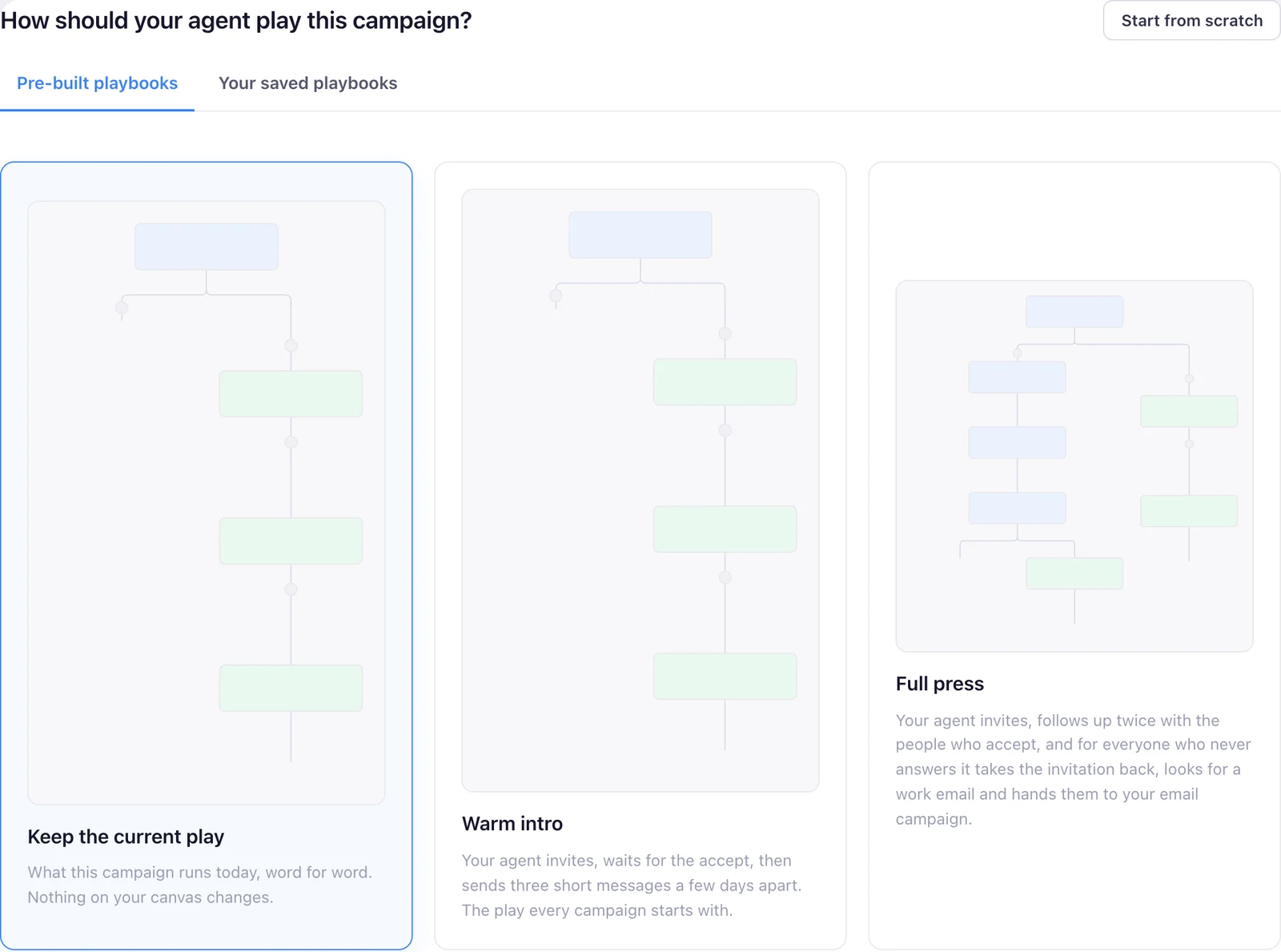
Our product, so you can see what the agent actually runs. Screens from the real app with demo data, and one illustration, labelled as such.
One account. One agent. Meetings at the end of it.
Paste your website. Your agent works out who should buy, finds those people on LinkedIn, and writes to them in your voice.
7 days free · cancel anytime · then $99 a month