
Expandi alternative: the agent picks the people, then writes to them
EaseClaw is the AI agent that finds warm buyers on LinkedIn and runs outreach for founder-led B2B companies, without building prospect lists by hand. Built for founders and small B2B sales teams selling high-value products or services, especially when there is no dedicated SDR. Expandi is one of the most capable execution tools in this category, and the comparison is genuinely a choice between two halves of the same job: Expandi runs a branching sequence against a list you built, and EaseClaw decides who belongs on the list in the first place. I have not run Expandi myself, and every fact about it below was read from expandi.io, its pricing page and its own blog on 16 September 2026, with the page it came from linked beside it.
Free for 7 days. Add a card to start, cancel any time before day 7 and you pay nothing.
What Expandi is, in its own words
It is a cloud outreach tool for LinkedIn with the network dressed per account: “Our cloud-based platform provides enhanced campaign capabilities that significantly boost the long-term efficiency of your outreach efforts”, with a “Dedicated country-based IP per account, automatic warm-up, fine-tuned daily limit ranges”. The campaign itself is the part they sell hardest: “Create automatic scenarios by combining 10 different actions and 10 conditions in one sequence based on your prospects’ behavior”, with InMail and email inside the same flow and third-party tools wired in through “existing or custom-made webhooks”. They put a volume claim on the home page too: “13M+ connection requests and 6M+ outbound messages”, which is their figure about their platform, quoted rather than endorsed.
Things this page will not tell you, because Expandi does not publish them: whether the trial captures a card, whether there is a public REST API behind the webhooks, and what the Agency tier costs. Their help-center article on recommended limits is behind a login and returned an authentication error on 16 September 2026, so nothing from it is quoted here either. Each of those was looked for on the day and is genuinely not readable.
What Expandi and EaseClaw cost
Both entry plans are $99, and the unit is the difference. Expandi bills per LinkedIn account, so the second account doubles the bill and the tenth is where the Agency tier takes over. EaseClaw bills per person and connects one LinkedIn account for them. The date in the last column links to the exact page each number was read from on 16 September 2026.
| Tool | Plan | Price | What it buys | Billing | Read on |
|---|---|---|---|---|---|
| Expandi | Business | $99 | per LinkedIn account per month | monthly | 2026-09-16 |
| Expandi | Business, billed annually | $79 | per LinkedIn account per month, on the "Annually (20% Off)" toggle | annual, billed yearly | 2026-09-16 |
| Expandi | Agency | Custom | ten seats and up ("+10 Seats"), no public figure | contact sales | 2026-09-16 |
| EaseClaw | Pro | $99 | per month, one LinkedIn account per person | monthly | 2026-09-16 |
| EaseClaw | Business | $199 | per month, one LinkedIn account per person | monthly | 2026-09-16 |
Two details worth reading off the pricing page rather than off a comparison site. The annual figure sits behind an “Annually (20% Off)” toggle, so $79 is a yearly commitment rather than a monthly price. And image and GIF personalisation is a separate line item: the plan lists it with “This service requires an additional cost to your existing subscription” printed beside it, with video personalisation running through a paid Sendspark add-on. On the trial, they answer the money question directly, “We will only charge you once you decide to use Expandi after completing your evaluation”, and say nothing about a card, so neither do we. On our side: Free for 7 days. Add a card to start, cancel any time before day 7 and you pay nothing.
EaseClaw compared with Expandi, row by row
Seven rows. Each Expandi cell carries a link to the page it was read from on 16 September 2026, so nothing here needs taking on trust. Read the rows where we come off worse as carefully as the rest.
| Expandi | EaseClaw | |
|---|---|---|
| Where the people come from | You bring them. The home page sells the run rather than the list: "Search and Connect on socials, Follow up with InMail and Email, and even more in one Linkedin outreach tool!" A campaign starts from a search you built, and the product takes it from there. | The agent builds the list. You paste your website, it works out what you sell and who should buy it, and it goes and finds people from what they just did: engaging with a rival's post, changing job, asking out loud for a recommendation, hiring for the problem you solve. |
| Who decides a person is worth writing to | The operator, as far as their public pages say. What Expandi publishes is the execution layer: a sequence that reacts to behaviour once a campaign is running, described as "10 different actions and 10 conditions in one sequence based on your prospects' behavior". Nothing on the home page or the pricing page offers to judge whether a person is a buyer before the campaign starts. | The agent does, against the picture of your ideal customer it built from your site and you edited. People who do not fit are dropped before anything is drafted, and that judgement is the part this product exists to take off you. |
| Who writes each message | You do, with placeholders. The Business plan lists "Dynamic Placeholders" and an "Unlimited Number of Templates", and personalisation beyond the text is sold as media: "Elevate your cold outreach with personalized videos, images, and GIFs that captivate your audience". | The agent writes the invite and the first message per person, in your voice, from the signal that surfaced them. Copilot puts the whole batch on screen before anything goes out. Autopilot approves inside the campaign you set up. |
| What a campaign can contain | The deepest step graph in this category. The Business plan includes a "Convenient Sequence Builder If/Action", "Engaging Actions Between Follow-ups" and "Campaign Types that Allow Bypassing Outreach Limits", and the home page puts the size of it in writing: ten actions, ten conditions, one sequence. InMail and email sit in the same flow. | The invite, the wait for the accept, the first message, follow-ups, and an email step that sends from your own connected mailbox. It ships as one editable play rather than a blank canvas, and it does not branch on what a prospect did. |
| How many accounts, and what a second one costs | The account is the billing unit, so the answer is a number you can read: "$99 Per Month" each, "$79" each billed annually. The Agency plan starts at "+10 Seats" and its price is "Custom", with roles, client reporting and "Use Expandi under your own brand". | One LinkedIn account per person, no rotation. A teammate can join the workspace and connect their own account, and every campaign names whose account sends it, but nobody sends from somebody else's and there is no roster of client accounts. If that is the job, buy HeyReach. |
| Where the sending runs | In their cloud, with the network dressed per account: "Our cloud-based platform provides enhanced campaign capabilities that significantly boost the long-term efficiency of your outreach efforts", plus "Dedicated country-based IP per account, automatic warm-up, fine-tuned daily limit ranges". | In the cloud as well, through a connected account, with a browser extension as the fallback for anyone who would rather it ran in their own session. Nothing about that changes what may go out: the campaign you set up is the boundary. |
| Integrations, and what a coding agent can reach | "Native CRM Integrations" and "Integrate any third-party tools using existing or custom-made webhooks". A public REST API is not something their home page states, so this row does not claim one either way. | Native pushes to HubSpot, Pipedrive and the rest from the Connections page, plus an MCP server, a REST API and a CLI. The machine surface reads and drafts; it never sends. |
Where Expandi is better than EaseClaw
Four things, checked against expandi.io and its pricing page on 16 September 2026. If two of them describe your week, buy Expandi and stop reading.
Expandi states the shape of its sequence builder rather than implying it: "Create automatic scenarios by combining 10 different actions and 10 conditions in one sequence based on your prospects' behavior", with an If/Action builder and engaging actions between follow-ups on the Business plan. EaseClaw runs one editable play, and it does not branch on what a prospect did. If your motion needs one path for people who opened and another for everybody else, that is a real gap on our side and a trial of ours will not close it.
Their Agency plan is built for the shape of an agency: "+10 Seats", "Flexible Roles & Permission Management", "Centralized campaign management", "Transparent reports for clients", a dedicated customer success manager and "Use Expandi under your own brand". EaseClaw connects one LinkedIn account per member, so a colleague can join and connect their own, but there is no pool to rotate, no client reporting and no white label at any price.
The home page sells it as a channel of its own, "personalized videos, images, and GIFs that captivate your audience", and the Business plan lists "Image & GIF Personalization" with the honest caveat printed beside it: "This service requires an additional cost to your existing subscription". Video runs through a paid Sendspark add-on. EaseClaw writes text. If a personalised image is the thing that gets your replies, they have it and we do not.
Because the account is Expandi's billing unit, adding one has a number you can read off the page before you talk to anybody: $99 a month, or $79 billed annually. Past ten seats the Agency tier takes over and the price becomes a conversation. EaseClaw has no second-account price at all, which sounds tidier than it is: it means the answer to "what does it cost to add a sender" is that you cannot.
None of those four is a gap a trial closes. Branching, a roster of accounts, a client-facing brand and a personalised image are product decisions on our side, and an honest comparison page is the place to say so rather than the place to bury it.
What Expandi publishes about LinkedIn’s own limits
People comparing these tools often arrive holding a number, and it usually came from Expandi, because they publish theirs. Read on 16 September 2026: “the LinkedIn maximum number of connections limit per day is approximately 20-25 invites” and “Free and LinkedIn Premium users can send up to 100 invitations per week”, with warm-up guidance to “Keep it to a max of 20 requests per day, 5 days a week” (that post is dated 7 January 2026). An older one adds “100 Messages per day” and “25 InMails per day (recommended but might vary)” (dated 24 October 2022).
Those are Expandi’s statements about what LinkedIn allows, on Expandi’s blog, and they are quoted here for one reason: so that a reader who arrived with the number knows where it came from and can go and read the post. They are not a setting in this product, they are not a promise from us, and this page does not translate them into a claim about EaseClaw. Their own help-center article on recommended limits is login-gated, so the two blog posts are the whole of what is publicly readable.
Which one is actually right for you
- Deciding who is worth writing to is the part that eats your week.
- You are the person selling, and you run one LinkedIn account.
- You want the invite and the follow up written per person, in your voice.
- One editable play beats a canvas you have to design before you can send.
- You want your own coding agent to read leads and draft over MCP.
The worked example: EaseClaw for MSP founders. An IT services owner with fifteen staff, no SDR, and a buyer who lives on LinkedIn pastes the company site, and the agent works out that the people worth writing to are operations leads at companies hiring their first internal IT person, or engaging with a rival MSP’s posts. An Expandi campaign would run that list beautifully once it existed; the reason that owner has not sent anything in three weeks is that the list does not exist. That example has its own page: EaseClaw for MSP founders. The method itself is free to read in the warm lead system.
- Your sequence has to fork on what the prospect did.
- More than one account needs to send, now or within the year.
- You bill clients and need reports and your own branding on the tool.
- A personalised image or GIF is the thing that gets you replies.
- You already know exactly who to contact and just want it executed.
Those are real gaps on our side and a trial of ours will not close them. If the job is rotating many accounts under one roof, neither tool is the cheapest answer: our HeyReach comparison covers the flat per-sender shape that is. If the pull is an agent that sources and writes rather than a sequencer, our Gojiberry comparison is the closer fight.
Moving from Expandi to EaseClaw, step by step
- Export the people your Expandi campaigns already touched, before you cancel. Their site does not publish what an export contains, so check inside the product rather than taking my word for it. What you want out of it is one column above all others: the LinkedIn profile URL, plus the name and the company if they come with it.
- Bring the file in when you create the campaign. Add leads, then Upload CSV file, and the rows are read in your own browser and attached to the new campaign (components/leadfinder/dash2/campaigns/AddLeadsModal.tsx:25-28: the file itself never leaves your machine, only the parsed rows travel). A LinkedIn profile URL on every row is the one thing that is required; a row without one is a name, not a person the agent can write to. The separate importer on the Contacts screen is a different door and will not help here: it reads LinkedIn’s own Connections and Invitations exports, to record who you have already reached.
- Paste your website and read the profile back. The agent writes what you sell and who should buy it in plain sentences. Edit them. Everything downstream, including who gets skipped before a draft is written, follows from those two paragraphs, so this is the ten minutes worth spending. This step has no Expandi equivalent, which is the whole point of the swap.
- Flatten your best branch into one play. A ten-condition scenario does not port, because there is nothing here to port it into. Take the path that produced most of your replies, keep its steps and its text, and drop the forks. If the forks were doing the work, that is a sign to stay where you are.
- Connect LinkedIn and run the first batch in Copilot. Read the whole batch before anything goes out, correct what reads wrong, then switch to Autopilot once the drafts stop needing edits.
Three things do not move at all: the branching, the image and GIF personalisation, and the dedicated country-based IP per account. The first two have no equivalent here, and the third is infrastructure Expandi sells and we do not describe on a selling page.
What EaseClaw looks like
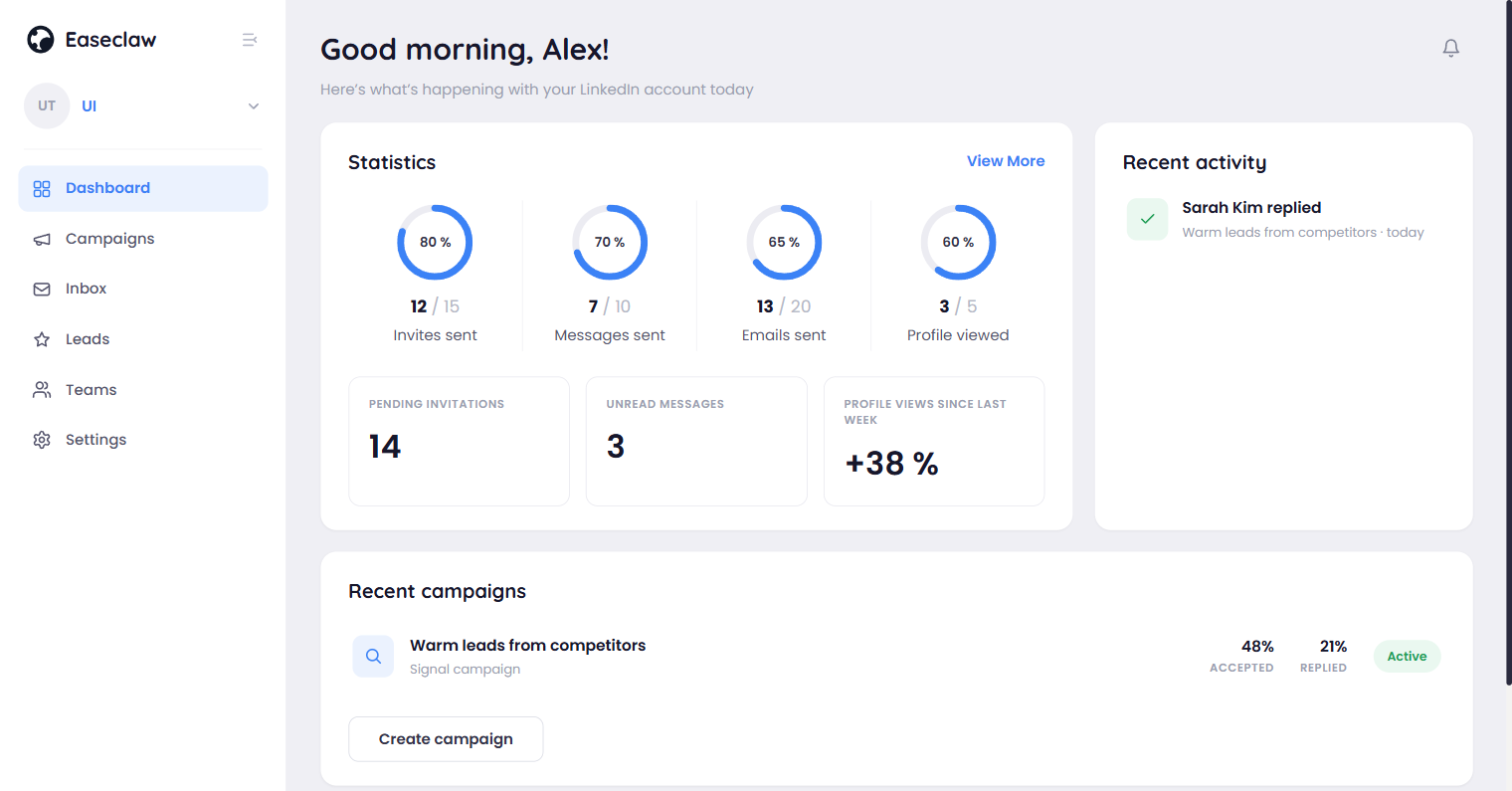
Our product, shown with example data. There are no Expandi screenshots anywhere on this page, because I have not run Expandi myself, and a screenshot would imply I had.

What a warm list costs, measured on our own outreach
Figures from our own ledger, not an industry study, and not a promise about what your campaigns will do. They are here because they are the arithmetic behind the one row in the table above that Expandi does not sell an answer to.
The 17% is the number that decides this comparison. Pulling the people who engaged with a competitor is cheap and it is not the hard part. Roughly one in six of them turned out to be another vendor selling into the same room, and taking those out by hand is the tax nobody quotes you for. A ten-condition sequence runs a bad list as faithfully as a good one, which is exactly why the picture of your ideal customer is worth more than the branching. The full ledger, with the date each figure was read:
- Competitor and creator posts we pulled the engagers from: 44 posts from 14 creators. Source: EaseClaw harvest ledger, marketing/harvests/engager-ledger.json, as of 2026-09-08.
- Unique people who had engaged with those posts: 1,672. Source: EaseClaw harvest ledger, marketing/harvests/engager-ledger.json, as of 2026-09-08.
- Those engagers who were vendors selling a rival tool: 286 of 1,672, or 17%. Source: EaseClaw harvest ledger, people marked as vendors, as of 2026-09-08.
- What it cost us to pull 1,434 engager profiles: $3.37, about a quarter of a cent per person. Source: EaseClaw harvest ledger, counters for 2026-08-06 to 2026-08-10, as of 2026-08-10.
- Posts read before 125 genuine buyers came out of them: 34,116 read, 5,789 scored, 125 buyers. Source: easeclaw.com/research/buying-intent-2026, as of 2026-08-04.
The wider view is on our buying-intent research page: 34,116 posts read, 5,789 scored, 125 people who turned out to be genuine buyers, as of 4 August 2026. Real buyers are rare, which is the whole reason a tool that picks the people is worth more than a tool that runs to the ones you picked.
Questions people ask before switching
How much does Expandi cost compared with EaseClaw?
Does Expandi have a free trial, and does it ask for a card?
How many LinkedIn invitations does Expandi say you can send?
Is EaseClaw a good Expandi alternative?
Can EaseClaw run conditional sequences like Expandi's?
I run outreach for a dozen client accounts. Which one should I choose?
Stop building lists. Start meeting buyers.
AI outreach for founder-led B2B teams. No lists. No SDR.
Free for 7 days. Add a card to start, cancel any time before day 7 and you pay nothing.